Video studio · iPhone

Shoot it. Finish it. Publish it.

Multi-clip editing, real colour grading, AI audio cleanup and 4K export — all of it on the phone in your hand. No laptop. No second app. No exporting something half-done and finishing it somewhere else.

Free to start · Greek and English · iPhone

Voxcene on iPhone: Let's make something, with Create a video and a row of ready-made templates

The difference

Captions can write your subtitles.
Templates can give you a starting point.
Voxcene helps finish the film.

The editor

Try the edit before you download it.

Choose a style, a language and how far to push it. The preview responds the way the app does — this is the caption engine itself, running in the page, not a recording of it.

  1. Where every edit starts: one vertical clip, straight off the camera roll.

Muted — there is no audio in this preview.

Original footage

One clip, nothing done to it yet. The waveform is the audio Voxcene is about to read.

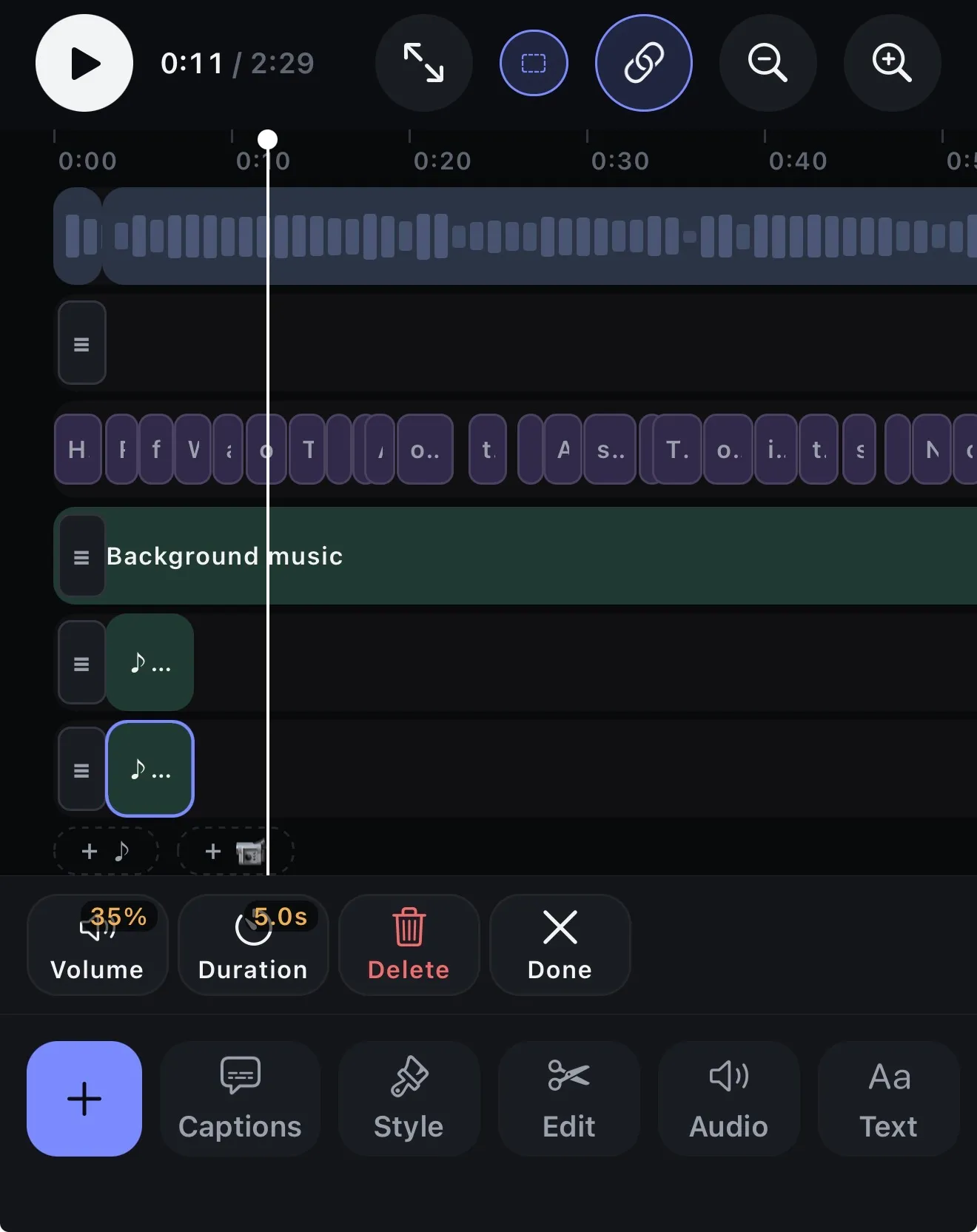
The Voxcene timeline: footage waveform, caption cards, a background music lane and two sound lanes, with volume and duration controls
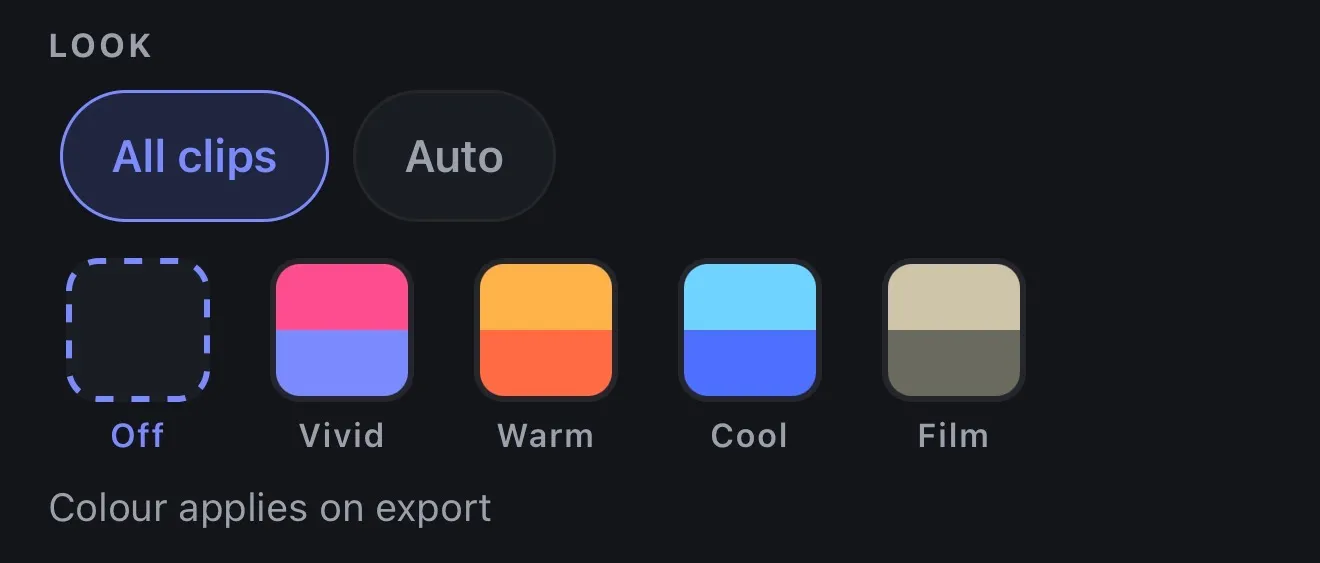
The Edit panel: the four graded looks, and the exposure and contrast sliders
The Audio panel: AI denoise, background music, and AI voiceover with a voice picker
The Style panel: caption templates in Greek and Latin, a font picker, size, and the colour rows

One

Cut it like you mean it.

Every lane on one timeline: the footage, the captions card by card, the music, each sound on its own track. Drag a clip, long-press a word to split there, set the volume and the duration of anything you drop in.

  • Multi-clip timeline
  • Split on a word
  • A lane per sound
  • Volume and duration

Two

Make it look like money.

Four looks, then seven controls under them — exposure, contrast, saturation, temperature, tint, vignette, sharpen. Live on the preview while you drag, exact in the file when you export.

  • 4 graded looks
  • 7 manual controls
  • Live preview
  • Punch-in zoom per beat

Three

Clean the audio nobody else will.

A neural model trained on speech takes the room away and leaves the voice. Silences and hesitations go in one tap. Words you would rather not publish get bleeped, in Greek and English, with the captions masked to match.

  • AI denoise
  • Auto trim
  • Censor, both languages
  • Music and voiceover

Four

Captions that belong to the video.

A hundred and six styles, then the font, the size and all three colours under each one. Greek is set with real Greek type — accents, the final sigma, the lot — not a Latin face hoping for the best.

  • 106 caption styles
  • Font and size
  • Text, highlight, background
  • Real Greek type

Caption styles

A hundred and six ways to say it.

Six of them here. Drag to compare — the difference between half of these only shows once the words are moving.

Κάθε λέξη μετράει — κάν' την να φανεί

Clean Minimal

The whole phrase, quietly.

Κάθε λέξη μετράει — κάν' την να φανεί

Bold Highlight

The spoken word in gold.

Κάθε λέξη μετράει — κάν' την να φανεί

Word Pop

One word at a time, scaled up.

Κάθε λέξη μετράει — κάν' την να φανεί

Editorial

Set like a magazine caption.

Κάθε λέξη μετράει — κάν' την να φανεί

Karaoke Bar

On a plate, for busy footage.

Κάθε λέξη μετράει — κάν' την να φανεί

Aegean Bold

Lit from behind.

The control room

Every detail,
still under your control.

The automatic pass gets you most of the way. Everything it decided is still a control you can reach — the grade, the type, the timing, the levels.

Caption style controls
Caption type and colour
Colour controls
Looks and manual grading
Audio controls
Denoise, music, voiceover
The spoken-language sheet
Every language it can hear

Continue Edit In development

Start the edit.
Let Voxcene learn the rest.

Cut the first thirty seconds the way you want the whole thing to feel. The idea is that Voxcene reads your pacing, your zooms and your caption timing, and carries them through the footage you have not reached yet. This one is still being built — it is not in the app today.

A diagram: a timeline whose first half is edited by hand, and whose second half is filled in with matching cuts, zooms and caption markers.

Snap to meaning In development

Cut where the thought ends.

A cut on the nearest frame lands mid-sentence and the line reads as a mistake. The idea is that the cut point moves to where the thought finishes instead. Not in the app yet — today you split a caption on a sentence yourself, in one tap.

A diagram: a cut marker sitting mid-sentence moves to the end of the phrase, and its label changes from Frame cut to Meaningful cut.

Audio

Clean the audio.
Keep the voice.

A model trained on speech pushes the room back and leaves what was said. Not silence — a kitchen still sounds like a kitchen. It sounds like a kitchen behind someone you can hear.

  • AvailableAI denoise, on export
  • AvailableSilences and fillers removed
  • AvailableBleeps, Greek and English

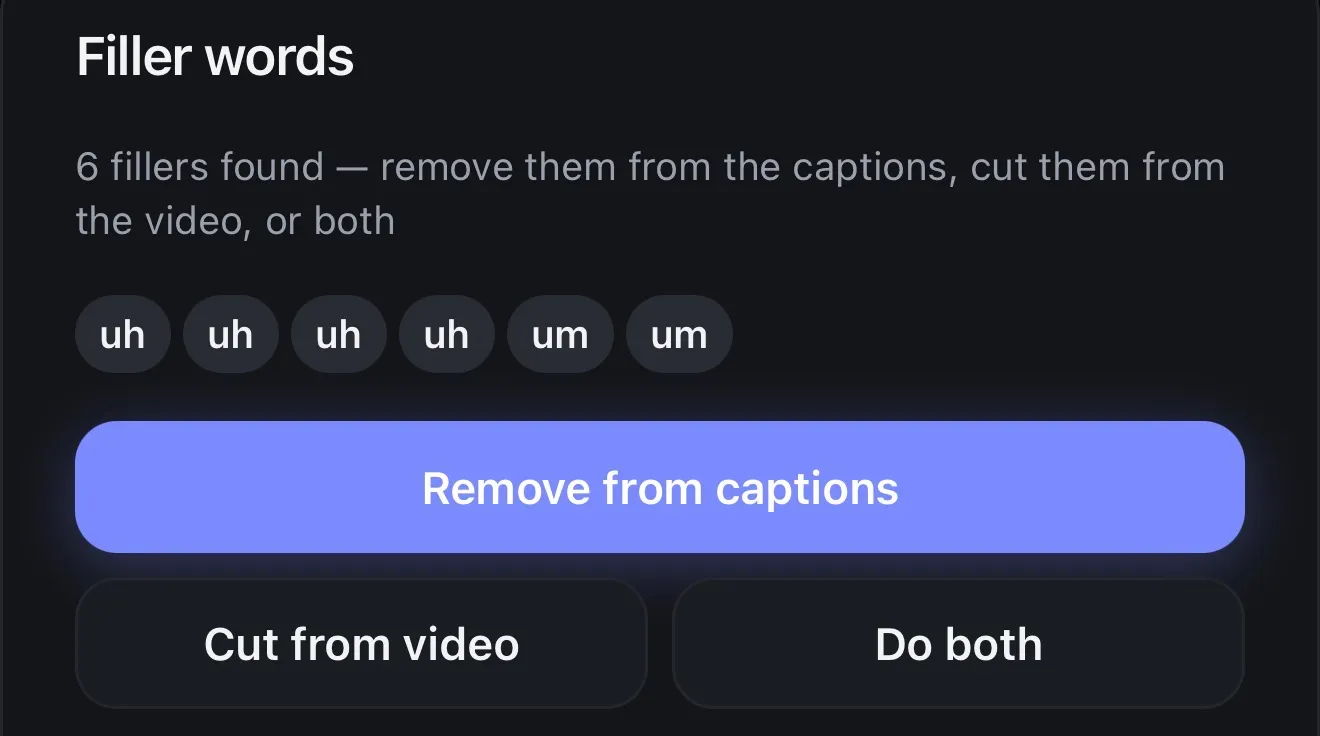
Filler words Available

Every εεε, found and counted.

Voxcene reads the transcript, finds the hesitations, and shows you the list before it touches anything. You choose whether they leave the captions, the video, or both.

  • Remove from captions The word goes from the subtitles. The video is untouched.
  • Cut from video The sound goes too, and the timeline closes up behind it.
  • Do both Gone from the captions and gone from the cut.

Single Greek letters are deliberately never on the list. Greek elides constantly — σ' αγαπώ, μ' αρέσει, ν' ακούσω — and a lone σ or μ is far more often a real word than a hesitation.

Ελληνικά 8 found

  • εεε
  • ααα
  • οοο
  • ουυ
  • εμμμ
  • χμμμμ
  • μμμ
  • εα

English 8 found

  • um
  • uh
  • hm
  • ehh
  • erm
  • huh
  • mhm
  • xmmm

The whole film, before you put the phone down.

Free to start. Paid plans lift the ceiling to 4K and open the AI tools.